

If you've been trying to install IPTV Smarters on a Firestick or Android TV box, you've probably run into the same wall: the app isn't always available directly in your device's app store, and the recommended install method involves an app called Downloader — which then asks you for a download code. That code is what this article is about.
The IPTV Smarters download code is a short numeric code you enter into the Downloader app to fetch the IPTV Smarters APK directly from the official IPTV Smarters website. It bypasses the need to type out a long URL manually and gets you to the install file in seconds. It's a small detail, but it's the step that trips up a lot of first-time users.
This guide covers exactly what the code is, where to find it, how to use it step-by-step, and what to do once the app is installed. By the end, you'll have IPTV Smarters running and a clear idea of what subscription to pair it with for the best possible experience.
What Is the IPTV Smarters Download Code?
The Downloader app — developed by AFTVnews and widely used on Firestick and Android TV devices — lets you install apps that aren't in the official app store by fetching them directly from a URL. Instead of typing a full web address, you can enter a short numeric code that Downloader maps to a URL automatically.
The IPTV Smarters download code is one of these short codes. Enter it into Downloader and it redirects to the official IPTV Smarters APK hosted on the IPTV Smarters website. The app downloads and installs like any other file — no typing out long addresses, no hunting for the right APK on sketchy third-party sites.
Where to Find the Official IPTV Smarters Download Code
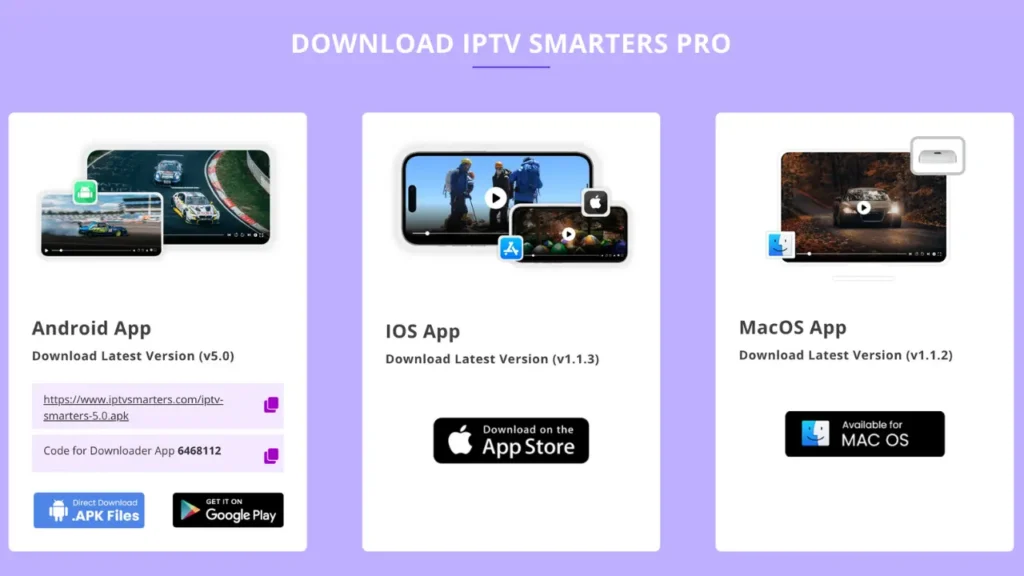
The current, official IPTV Smarters download code is published directly on the IPTV Smarters website at iptvsmarters.com. Head to their downloads or installation page and you'll find the Downloader code listed alongside instructions for different devices. The team updates it when the app version changes, so going to the source is always the right move — it ensures you're getting the latest version of the app, not an outdated APK from a random forum post.
Don't use codes shared on Reddit threads or third-party download sites unless you can verify they link back to the official IPTV Smarters domain. The Downloader code is only useful if it points to a legitimate, unmodified APK.
How to Use the IPTV Smarters Download Code: Step-by-Step
The process is the same whether you're on a Firestick, Fire TV Cube, or an Android TV box. Here's the full walkthrough.
Step 1: Enable Apps from Unknown Sources
Before Downloader can install anything, your device needs to allow apps from outside the official store. On Firestick, go to Settings → My Fire TV → Developer Options and turn on Install Unknown Apps, then enable it specifically for Downloader. On Android TV boxes, go to Settings → Security and toggle on Unknown Sources.
Step 2: Install Downloader
Search for "Downloader" in your device's app store — it's free and published by AFTVnews. Install it. If it's already on your device, make sure it's updated to the current version.
Step 3: Enter the IPTV Smarters Download Code
Open Downloader and you'll see a text field on the home screen. This is where the IPTV Smarters download code goes. Get the current code from iptvsmarters.com — it'll be a short numeric string — type it in and hit Go. Downloader will resolve the code to the APK download URL automatically.
Step 4: Download and Install
The APK file will download to your device. Once it's finished, Downloader prompts you to install it. Tap Install, wait for it to complete, then tap Done (or Open if you want to launch it immediately). IPTV Smarters is now installed and ready to configure.
Step 5: Clean Up
After installation, Downloader will offer to delete the APK file to free up storage. Go ahead and delete it — the app is already installed and you don't need the installer file sitting around.
Why Use a Download Code Instead of the App Store?
Fair question. On some devices — particularly older Firestick models or devices running specific regional app stores — IPTV Smarters isn't listed or the available version is outdated. The official IPTV Smarters website keeps the latest APK current, while app store listings sometimes lag behind.
Sideloading via Downloader also gives you access to the full version of the app without regional restrictions. Some app stores show a stripped-down or differently configured version depending on your account's country setting. Going directly to the source sidesteps all of that.
The Downloader code method is also what IPTV Smarters themselves recommend for Firestick installation on their website — so it's not a workaround, it's the intended install path for that platform.
Setting Up IPTV Smarters After Using the Download Code
Once the app is installed From the downloader via an IPTV smarters download code, the next step is connecting it to your IPTV subscription. IPTV Smarters supports two main login methods.
Xtream Codes API Login
This is the most common method. Your IPTV provider gives you a username, password, and server URL when you subscribe. In IPTV Smarters, select Add New User → Login with Xtream Codes API, enter those three details, and the app connects to your provider's server and pulls your full channel list, VOD library, and EPG automatically.
M3U Playlist Login
Some providers supply an M3U URL instead. Select Add New User → Load your playlist or file/URL and paste the link. The app fetches and organises your channels from that file. This method works just as well — it's just a different format that some providers prefer.
Either way, once connected, IPTV Smarters loads your channels into a grid EPG, separates live TV from VOD, and organises everything by category. The first EPG load can take a couple of minutes if your subscription carries a large programme guide — that's normal.
What IPTV Smarters Offers Once It's Running
The iptv smarters download code gets you the app. Here's what you actually get once it's working.
Full EPG Grid
IPTV Smarters displays a proper grid-style Electronic Program Guide — what's on now, what's coming up, channel by channel. If your provider supports it, you can scroll back through past programming to access catch-up content directly from the guide. For live TV use, this feature alone puts it ahead of basic players that just show a plain channel list.
Multi-Screen and Multi-User Support
You can add multiple user accounts inside the app — useful if you're running different subscriptions or trialling services side by side. Each account is stored separately, and switching between them takes a few taps.
VOD Organisation
Films and series from your subscription appear in dedicated sections within the app, displayed with thumbnails and basic metadata. It's not as visually polished as a dedicated streaming platform, but it's functional and navigates well with a remote.
Cross-Device Availability
Once you've used the IPTV Smarters download code to install it on your Firestick or Android box, the same app is available on iOS and Android phones, Smart TVs, and other platforms — so you can log into the same subscription across devices without needing a separate player on each one.
IPTV Smarters vs Other Players: Quick Comparison
| App | Sideload via Downloader | Xtream Codes | M3U Support | EPG Grid | Platforms |
|---|---|---|---|---|---|
| IPTV Smarters | Yes (official download code) | Yes | Yes | Yes | Android, iOS, Firestick, Smart TV |
| TiviMate | Yes | Yes | Yes | Excellent | Android TV / Fire TV only |
| GSE Smart IPTV | Yes | Yes | Yes | Yes | Android, iOS |
| OTT Navigator | Yes | Yes | Yes | Yes | Android TV |
| Perfect Player | Yes | No | Yes | Basic | Android |
IPTV Smarters stands out here for one specific reason: it's the only player on this list that has an official download code on its own website, making sideloading straightforward even for users who've never done it before. TiviMate has a better interface, but it's Android TV only. For cross-platform coverage, IPTV Smarters is hard to beat.
The Subscription That Makes IPTV Smarters Worth Setting Up
Using the IPTV Smarters download code and getting the app installed is the easy part. What you connect it to determines whether the whole setup is worth your time.
The service that consistently delivers at the level IPTV Smarters is capable of handling is IPTV Subscription 4K. Load it into IPTV Smarters via Xtream Codes and you get immediate access to 47,000+ live channels — sport, news, international content, regional channels, entertainment across dozens of countries. The EPG grid in IPTV Smarters fills out completely, giving you a proper TV guide experience rather than a bare list of streams.
The VOD library covers 180,000+ films and series, displayed neatly in IPTV Smarters' Films and Series sections. Catch-up TV means the EPG isn't just for browsing — you can scroll back and watch programming from the past several days directly through the guide.
For anyone running IPTV Smarters on a 4K-capable device, the service delivers genuine 4K ultra-HD streams with anti-freezing technology that keeps things stable during high-demand events. The difference between this and a cheap provider becomes obvious the first time a major sporting event is on — budget servers buckle; this one doesn't.
Pricing is flexible and straightforward:
- €15/month — month-to-month, no commitment
- €30 for 3 months — saves you €15 versus monthly
- €45 for 6 months — solid value for regular users
- €65/year — under €5.50/month; the obvious choice once you know you like it
24/7 customer support is available at every tier — so if something isn't loading in IPTV Smarters after setup, there's someone to help you troubleshoot at any hour. The subscription also works across Smart TV, Firestick, Android, iOS, and MAG boxes, so the same account covers every screen in your home.
Common Questions About the IPTV Smarters Download Code
Where exactly do I find the IPTV Smarters download code?
Go to the official IPTV Smarters website at iptvsmarters.com. Navigate to their downloads or installation section and you'll find the current Downloader code listed there for Firestick and Android TV devices. Always use the code from the official site to make sure you're installing the genuine, up-to-date version of the app.
What is the Downloader app and do I need it?
Downloader is a free app by AFTVnews available in the Amazon App Store and Google Play. It lets you install apps from outside the official store by downloading APK files directly from a URL — or via a short numeric code that maps to a URL. For installing IPTV Smarters on Firestick, it's the recommended method and takes about two minutes from start to finish.
Do I need to turn anything on before using the download code?
Yes — you need to enable installation from unknown sources on your device first. On Firestick, go to Settings → My Fire TV → Developer Options → Install Unknown Apps and enable it for Downloader. Without this, the device will block the installation even after the APK has downloaded.
Is the IPTV Smarters download code the same as my subscription login?
No — these are two completely separate things. The iptv smarters download code is a short number you enter into the Downloader app to install IPTV Smarters on your device. Your subscription login (Xtream Codes credentials or M3U URL) is what you enter inside the IPTV Smarters app after it's installed to connect to your IPTV provider. One gets the app onto your device; the other gets the content into the app.
Can I use the same download code to update IPTV Smarters later?
Yes. If a new version of IPTV Smarters is released and you want to update manually, you can repeat the same process — open Downloader, enter the IPTV smarters download code from the IPTV Smarters website, and install the new APK over the existing version. Your account credentials and settings are usually preserved through an update install.
What if the download code isn't working in Downloader?
First, make sure you're entering the code exactly as shown on the IPTV Smarters website — no spaces, correct digits. If it still doesn't work, the code may have been updated for a new app version. Refresh the IPTV Smarters website to get the latest code. As a fallback, you can enter the full APK download URL from the IPTV Smarters site directly into Downloader instead of the short code.
Final Thoughts
The IPTV Smarters download code is a simple tool that solves a specific problem: getting the app onto devices where it's not easily available through the app store. Head to iptvsmarters.com, grab the current code, punch it into Downloader, and you're installed in under two minutes. That's genuinely it.
What takes more thought is the subscription you load into it. IPTV Smarters is just the player — the content, reliability, and overall experience come from whoever's running the servers behind it. With 47,000+ channels, a 180,000+ VOD library, and real 4K streaming, IPTV Subscription 4K is the service that makes the setup worth doing in the first place. Start with the monthly plan, and the annual rate will speak for itself.