
Picture this: you’ve just signed up for an IPTV service, you’ve got your credentials in hand, and then the provider sends you a link and says “just load it in your IPTV portal.” If you’ve never heard that term before, it’s a perfectly reasonable moment to pause and wonder what exactly you’ve gotten yourself into.
An IPTV portal is the front-end interface through which you access your IPTV subscription — think of it as the dashboard for your streaming service. It’s how you browse channels, access your VOD library, and navigate your Electronic Program Guide. Understanding how it works isn’t just trivia — it directly affects which devices you can use, how smooth your experience will be, and what happens when things go wrong.
This guide covers what an IPTV portal actually is, how it functions under the hood, what separates a good one from a frustrating one, and what you should be looking for before you commit to any subscription.
What Is an IPTV Portal?
At its core, an IPTV portal is a web-based or app-based interface that acts as the control center for your IPTV service. When you subscribe to an IPTV provider, you’re essentially getting access to a stream server. The IPTV portal is the layer that sits between you and that server — it organizes the content, handles authentication, displays your channel list, and manages playback.
There are two main types of portals in common use today.
The first is a web-based portal — a URL you open in a browser or enter into a set-top box like a MAG device. You type in the portal URL, enter your username and password, and the interface loads directly. MAG boxes from Infomir are built around this model, and it’s also how many portal-based IPTV services work on Formuler devices.
The second type is an app-based portal — a dedicated application like IPTV Smarters Pro, TiviMate, or GSE Smart IPTV. These apps connect to your provider’s server using Xtream Codes API or an M3U playlist URL, then build an interface around that data. From a user perspective, the app is the portal.
Either way, the purpose is the same: give you a structured, navigable front-end for your live TV, VOD content, and catch-up streams.
How Does an IPTV Portal Work?
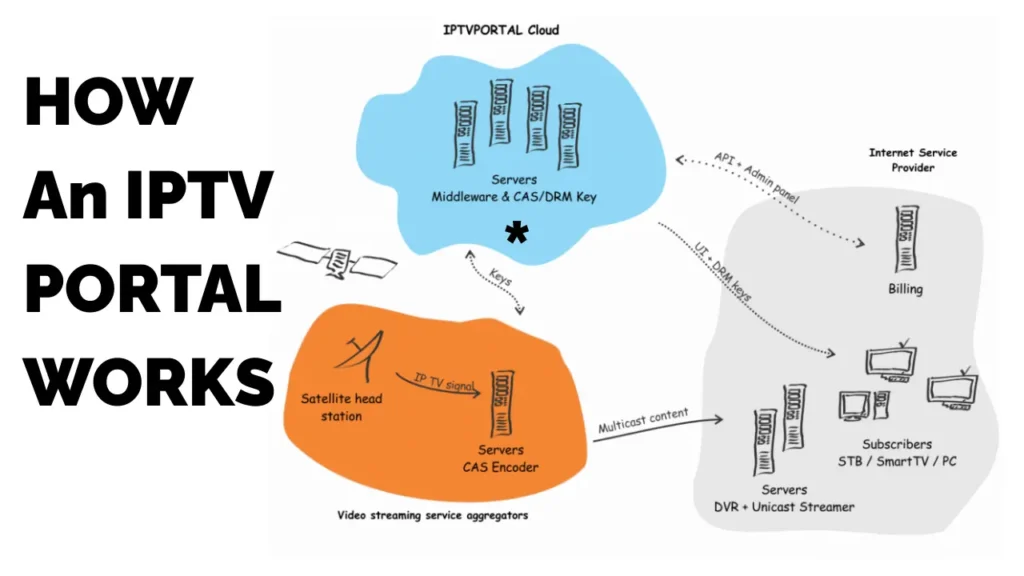
When you open your IPTV portal and log in, several things happen in quick succession that most users never think about.
First, your device sends your credentials to the provider’s authentication server. The server checks whether your subscription is active and what tier of access you’re on. If everything checks out, it returns a token or session key that unlocks the content for your device.
Next, the portal pulls your channel list — technically called an M3U playlist. This is a text file containing thousands of streaming URLs, each one pointing to a live channel or VOD title on the provider’s servers. The portal reads this file and organizes it into categories: Sports, News, Movies, Kids, and so on.
What Happens When You Click Play
When you select a channel, the IPTV portal sends a request to the stream server for that specific URL. The server begins sending video data in small chunks — this is the actual stream. Your device buffers a few seconds of that data, then begins playback.
The smoothness of what happens next depends on the server’s capacity and your internet connection. If the server is handling thousands of simultaneous connections (say, during a major live football match), the stream can degrade or drop. That’s a server-side problem, not the IPTV portal’s problem — though users often blame the interface.
The EPG Layer
A well-configured IPTV portal also loads an Electronic Program Guide — the on-screen TV schedule that tells you what’s on now and what’s coming up. The EPG data comes from a separate XML feed that the provider maintains. Some providers update it constantly; others let it go stale, which is why you sometimes see a portal with blank schedule data on half the channels.
Key Features of a Good IPTV Portal
Not all portals are created equal. Here’s what separates a polished experience from a mediocre one.
| Feature | Basic Portal | Quality Portal |
|---|---|---|
| Channel Organization | Flat list, minimal categories | Categorized, searchable, favorites |
| EPG Accuracy | Partial or outdated | Full, real-time schedule data |
| VOD Navigation | Simple list | Genre filters, search, continue watching |
| Catch-Up TV | None or limited | 7-day replay with timeline scrubbing |
| Multi-Screen Support | 1 connection | 2–5 simultaneous streams |
| Stream Quality Options | Fixed quality | Adaptive or selectable (SD/HD/4K) |
| Device Compatibility | MAG or browser only | All platforms (Android, iOS, Smart TV, PC) |
| Search Functionality | None | Universal search across live + VOD |
| Parental Controls | Absent | PIN-protected content filters |
The features that matter most in daily use are EPG accuracy and VOD navigation. A portal that shows you a blank schedule or makes you scroll through 50,000 titles with no filter system is technically functional but genuinely annoying to use.
Honest Take: What Actually Frustrates Users
The IPTV portal experience has improved significantly over the last few years, especially with third-party apps like TiviMate raising the bar on what users expect. But some persistent problems keep showing up in forums and user communities.
Authentication errors are the most common complaint. These happen when the portal can’t reach the provider’s authentication server — usually a temporary outage on the provider’s end, but it looks like a login failure to the user. The frustrating part is that there’s often no error message explaining this, just a blank screen or a spinning loader.
EPG mismatches are another regular headache. The channel is working fine, but the schedule shown in the portal is off by an hour, or it’s showing yesterday’s listings, or it’s blank. This isn’t a portal bug — it’s a provider data quality issue — but it degrades the experience all the same.
Buffering during peak hours is worth mentioning again, because users often blame the portal interface when the actual problem is server load. A good portal can’t fix a bad server. This is why the underlying infrastructure matters at least as much as the interface design.
On the positive side, a properly set-up portal — especially on a dedicated player like TiviMate on an Android device — genuinely feels like a premium TV experience. The channel switching is fast, the EPG is navigable, and the search works well. When it’s good, it’s hard to fault.
IPTV Portal vs. Other Access Methods
There are three main ways to access an IPTV subscription: via a portal URL, via an M3U playlist, or via Xtream Codes API. Understanding the differences helps you choose the right setup for your situation.
Portal URL access is typically used with MAG boxes and Formuler devices. You enter the portal URL directly into the device’s browser or firmware settings. The advantage is simplicity — no app to install, no extra setup. The downside is that you’re locked into whatever interface the device’s firmware provides, which can feel dated.
M3U playlist access gives you the most flexibility. You load the playlist into any compatible player and that player becomes your portal. This is how most Firestick and Android TV box setups work. The interface quality depends entirely on which player you choose.
Xtream Codes API is similar to M3U but more efficient. Instead of downloading a massive playlist file every time, the player fetches content metadata on demand. Better players, faster load times, and smoother catch-up TV integration. Most modern IPTV subscriptions support all three methods.
What to Look for Before You Subscribe
The portal experience is only as good as the provider powering it. Before handing over money for any IPTV subscription, there are a few things worth checking.
Does the provider offer a trial? Any provider confident in their service should let you test stream quality on your connection before committing. A one-day or 24-hour trial costs them almost nothing and tells you exactly what you need to know.
How is the channel count structured? A provider advertising 100,000 channels is almost certainly padding with duplicates and dead links. A realistic number with consistent uptime beats an inflated list of broken streams.
Is there live customer support? Email-only support with 48-hour response times is a red flag. When your stream goes down before a big match, you need someone available to help.
A Subscription That Gets the Portal Experience Right
If you’re looking for an IPTV service where the IPTV portals experience actually holds up under daily use, the subscription offered on this site is worth a serious look.
The content library alone sets it apart — over 47,000 live channels covering every major region and language, plus a VOD library of 180,000+ films and series that’s actually maintained and updated. Most budget providers can’t come close to either number.
The EPG is full and current, which makes the catch-up TV feature genuinely usable rather than a checkbox feature. You can scroll back up to 7 days on supported channels, which is the kind of functionality that only works when the schedule data is actually accurate.
On the technical side, the service uses anti-freezing architecture to manage high-load events — the kind of infrastructure investment that shows up when you’re trying to watch a Champions League knockout round and your stream stays stable while others collapse. The 4K Ultra-HD quality is consistent, not just a marketing claim on a sales page.
Compatibility is broad: Smart TVs, Amazon Firestick, Android boxes, iOS, MAG devices, and any player that supports M3U or Xtream Codes. Setup takes about five minutes regardless of device.
Pricing is structured sensibly. A monthly plan runs €15 — a reasonable amount to test the service properly before committing. The 3-month plan is €30, 6 months is €45, and the annual plan comes to €65, which is around €5.40 a month. Given that 24/7 customer support is included at every tier, that pricing holds up well against what’s available in the market.
Frequently Asked Questions About IPTV Portals
What’s the best app to use as an IPTV portal?
TiviMate is widely considered the best IPTV player for Android and Android TV devices. It supports M3U playlists and Xtream Codes, has an excellent EPG layout, and handles catch-up TV well. IPTV Smarters Pro is a solid cross-platform alternative that works on iOS, which TiviMate doesn’t currently support. For Smart TVs, built-in apps or the provider’s recommended player are usually the way to go.
Why does my IPTV portal keep asking me to log in?
This usually means one of two things: your session is expiring because the provider’s authentication server has a short token timeout, or the portal URL you’re using has changed. Check with your provider for an updated portal link. If the problem persists, it may be a server-side issue on their end that support can address.
Can I use an IPTV portal on a MAG box?
Yes, MAG boxes are specifically designed around portal-based IPTV access. You enter your provider’s portal URL in the device settings, and the interface loads through the MAG firmware. It’s one of the cleanest ways to use an IPTV portal if the provider supports that format.
How is an IPTV portal different from a smart TV app?
A smart TV IPTV app is essentially a portal built as a native application for your TV’s operating system (Samsung Tizen, LG webOS, Android TV, etc.). It connects to your provider’s servers the same way any portal does, but it’s installed as a standalone app rather than accessed through a browser or set-top box. The user experience is often smoother because the app is optimized for the platform.
Does the IPTV portal affect stream quality?
Not directly. The portal is the interface layer — it doesn’t encode or transmit the video stream itself. Stream quality depends on the provider’s servers, your internet connection, and the protocol used to deliver the content. That said, a poorly coded portal can cause buffering by making inefficient server requests, so the quality of the software does matter, even if the content delivery is separate.
What is a portal URL in IPTV?
A portal URL is the web address of your IPTV provider’s interface server. When you enter it into a MAG box, Formuler device, or compatible browser, it loads the provider’s front-end — the channel list, EPG, and VOD library. Think of it as the “home page” of your IPTV subscription. Your provider usually gives you this URL alongside your login credentials.
Wrapping Up
The IPTV portal is the part of your streaming setup that you interact with every single day, which makes it worth understanding — and worth caring about when you choose a provider.
A good portal, backed by a reliable server, full EPG data, and a deep content library, makes IPTV feel like a genuine replacement for traditional TV. A bad one turns what should be simple — finding a channel and pressing play — into an exercise in frustration.
If you’re in the market for an IPTV subscription and want one where the portal experience is actually backed by solid infrastructure, the service on this site is built for exactly that. Starting at €15/month, with 47,000+ channels, a 180,000+ VOD library, and real 24/7 support, it’s one of the more complete options available right now.