

“iptv box fully loaded” is one of those phrases that shows up everywhere in marketplace listings and IPTV forums, and it sounds exactly like what most people want — a device that’s ready to go the moment it arrives, with everything pre-configured and nothing left to figure out. The reality is a bit more complicated than that.
An IPTV Box fully loaded typically means the hardware comes pre-installed with apps, sometimes pre-configured with a specific IPTV subscription, and marketed as a plug-and-play streaming solution. For someone who just wants to cancel cable and start watching, that pitch is genuinely appealing.
But the term covers an enormous range of actual setups, and not all of them deliver what the listing implies. Some iptv box fully loaded are legitimately well-prepared with quality apps and stable subscriptions. Others are underpowered hardware loaded with junk apps and a subscription that’ll stop working in three months.
This guide breaks down what you’re actually buying when you see that phrase, what to look for, and how to build a setup that actually holds up long term.
What Does “IPTV Box fully loaded” Actually Mean?
There’s no standard definition, which is part of the problem. When a seller describes an IPTV box as fully loaded, they generally mean one or more of the following:
The box comes pre-installed with IPTV player apps (TiviMate, IPTV Smarters, Kodi, etc.) so you don’t have to source and install them yourself. That’s a convenience, not a guarantee of quality.
Some sellers go further and pre-configure the box with an active IPTV subscription — meaning the channels, VOD library, and EPG are already loaded and working when you first power it on. This is where the “fully loaded” pitch gets genuinely interesting, and also where the risks start.
A third category is boxes pre-loaded with Kodi and third-party add-ons that scrape streaming sources from the web. This is a different thing entirely from a proper IPTV subscription — the legality is murkier, the stream quality is inconsistent, and the add-ons frequently break when the scraped sources change.
The Subscription Bundling Question
When a box comes with a subscription already installed, that subscription typically runs for a fixed period — one month, three months, sometimes six. After it expires, you’re either buying another bundle from the same seller or hunting for a replacement service yourself.
The quality of that bundled subscription varies wildly. Some sellers use decent IPTV providers with stable infrastructure; others use the cheapest available option to maximize their margin. You often don’t find out which one you’ve got until you try to watch a live match and the stream dies in the first half.
How an IPTV Box fully loaded Works
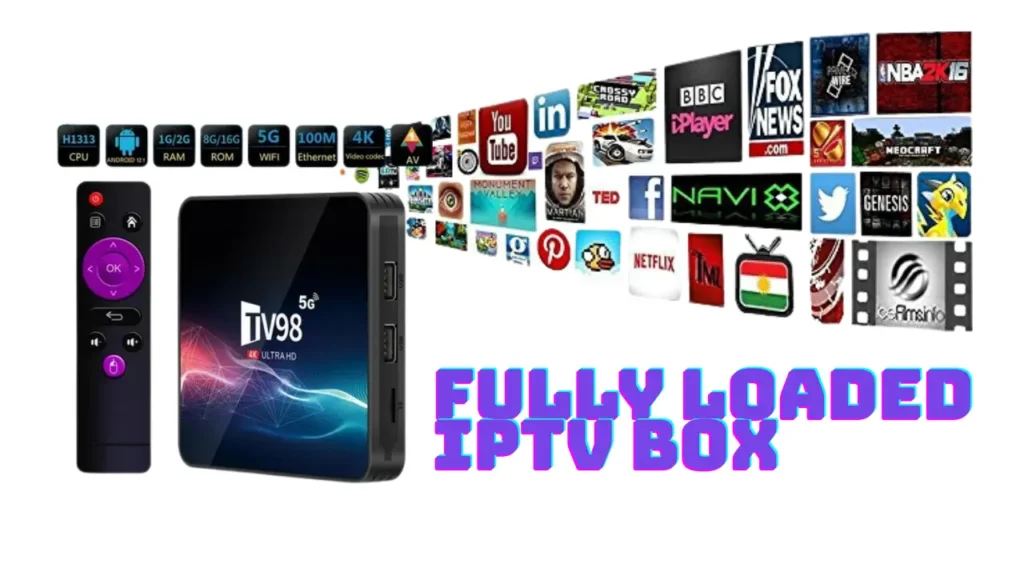
The technical mechanics are the same whether the box is pre-configured or set up manually. Understanding the flow helps you evaluate what “fully loaded” actually gets you.
When you power on an IPTV box with a pre-loaded subscription, the IPTV player app launches and authenticates automatically with the provider’s server using credentials already stored in the app. Your device connects to the provider’s stream server, downloads your M3U playlist (the channel list), and loads the Electronic Program Guide data. From your end, you just see your channel list appear.
The Hardware Layer
The device itself is an Android-based set-top box — the same core hardware as any Android TV box, just marketed with the IPTV use case front and center. Processing power, RAM, and video decode capability determine whether the box can handle HD and 4K streams without stuttering.
An IPTV Box fully loaded with a strong subscription but underpowered hardware will still buffer on 4K content. Conversely, excellent hardware with a poor subscription service will buffer because the server can’t handle the load — not because the box is the problem. Both layers matter.
Pre-Loaded Apps vs. DIY Setup
Here’s a comparison between buying an IPTV Box fully loaded versus building the same setup yourself:
| Factor | IPTV Box Fully Loaded | Self-Setup (Box + Subscription) |
|---|---|---|
| Initial Convenience | High — works out of the box | Low — requires app install + config |
| App Quality | Variable — seller’s choice | Your choice — use the best available |
| Subscription Quality | Variable — unknown provider | Your choice — research before buying |
| Cost Transparency | Bundled, harder to assess | Clear — separate hardware + sub costs |
| Long-Term Flexibility | Limited — tied to seller’s service | Full — switch providers any time |
| Support | Seller-dependent | Provider + app developer support |
| Ongoing Control | Low — dependent on seller | High — manage your own setup |
The table makes the trade-off clear. A fully loaded box wins on day-one convenience. A self-configured setup wins on every other dimension, especially once you’ve done it once and know how straightforward the process actually is.
What Makes a Good IPTV Box fully loaded
If you’re set on buying a pre-configured option rather than setting one up yourself, here are the factors worth evaluating before you spend money.
Hardware Specifications
The same rules that apply to any Android IPTV box apply here. Look for at least 4GB of RAM and a processor capable of HEVC/H.265 hardware decode for 4K streams. Amlogic S905X4 or S922X processors are reliable in this respect. Anything running on 2GB of RAM with an older processor will struggle with 4K content and feel sluggish navigating large channel lists.
Dual-band Wi-Fi (2.4GHz and 5GHz) and a Gigabit Ethernet port are worth having. For live sports specifically, a wired connection is always more reliable than Wi-Fi. An IPTV Box fully loaded without an Ethernet port is giving up one of the most effective ways to reduce buffering before you’ve even started.
The Pre-Loaded Subscription
Ask the seller directly which IPTV provider’s service is bundled on the box. If they won’t tell you, that’s a signal. If they do tell you, search that provider’s name in Reddit communities like r/IPTV — you’ll quickly find out whether it’s a service with a track record of reliability or a reseller of a reseller that goes down during every major event.
Check what happens when the bundled subscription expires. Some sellers offer renewal packages; others leave you to figure it out. Knowing in advance prevents you from being stuck without a service after paying for the hardware.
The Kodi Question
Many IPTV Box fully loaded are really just Android boxes with Kodi installed and configured with third-party add-ons. This is worth distinguishing from a proper IPTV subscription setup. Kodi add-ons scrape publicly available (and often unlicensed) streams — quality and legality vary significantly. A proper IPTV subscription is a structured service with dedicated server infrastructure and a maintained channel list. They’re different products with different experiences.
Honest Assessment: Who Should Buy an IPTV Box fully loaded
There’s a genuine use case for a pre-configured IPTV box. If you’re buying for a relative who won’t be comfortable installing apps or entering credentials, a properly configured device handed over ready-to-go is a reasonable solution — provided the subscription running on it is actually reliable.
For everyone else who’s comfortable spending ten minutes setting up an app and entering a URL, building the setup yourself gives you better control, better app choices, and the freedom to switch providers without buying new hardware.
The “IPTV Box fully loaded” premium you pay — usually €20–€80 more than the same hardware without pre-configuration — buys you setup convenience. It does not buy you a better IPTV service. The best IPTV subscriptions are available to anyone, not exclusive to bundled hardware packages.
Why the Subscription Matters More Than the Box
This is the point most hardware-focused listings gloss over: the box is just a player. The subscription is the service. And it’s the service that determines whether your experience is good or not.
A quality IPTV subscription running on a mid-range Android box will outperform a poor subscription on premium hardware every single time. Server reliability, channel maintenance, EPG accuracy, and support responsiveness — these are what separate a service worth paying for from one that frustrates you within a month.
The subscription offered through this site illustrates the difference. Over 47,000 live channels span every major market — UK, US, European sports leagues, Arabic, French, African, and Asian content, all structured and maintained. Not a padded list; a working one.
The VOD library sits at 180,000+ titles, which is large enough that you’ll genuinely run out of things you want to watch before you run out of options. The catch-up TV feature is backed by a full, accurate EPG — meaning you can scroll back through the previous seven days on supported channels and the guide data is actually correct.
On the technical side, the service uses anti-freezing infrastructure to manage peak demand. When a major football final or boxing event draws simultaneous streams from thousands of users, the load distribution keeps streams stable. That’s the scenario where cheaper, under-resourced services fall down.
4K Ultra-HD quality is consistent — the hardware on any mid-range or premium Android box can take full advantage of it. Compatible with every major device: Smart TVs, Firestick, Android boxes, iOS devices, MAG set-top boxes, and any player supporting M3U or Xtream Codes.
Pricing is €15/month, €30 for three months, €45 for six months, and €65 for a year. All tiers include 24/7 customer support — which matters when something breaks at an inconvenient time.
Frequently Asked Questions About IPTV Boxes Fully Loaded
Is it Worth To Buy an IPTV Box fully loaded ?
It depends on what’s loaded on it and who it’s for. If the hardware is decent (4GB RAM, HEVC decode, dual-band Wi-Fi) and the subscription is from a provider with verified reliability, then yes — for someone who wants zero setup friction. For technically comfortable buyers, setting up your own app and subscription gives more control and usually better value. The pre-configuration premium rarely reflects better service quality.
How long does the subscription on an IPTV Box fully loaded last?
It varies by seller. Most bundle one to three months of a subscription as part of the purchase price. After that, you either renew through the seller or find an alternative provider. Always ask before buying — some sellers are vague about expiry dates and renewal costs, which can be frustrating if you didn’t know to ask.
Can I update the subscription on an IPTV Box fully loaded?
Yes. An IPTV player app (TiviMate, IPTV Smarters, etc.) is just software — you can change the subscription credentials in the app settings at any time. When the pre-loaded subscription expires, you can replace it with any IPTV service that provides M3U or Xtream Codes credentials. The hardware isn’t locked to a specific provider.
What’s the difference between an IPTV Box fully loaded and a jailbroken Firestick?
A jailbroken Firestick typically refers to a Firestick with sideloaded apps — Kodi, third-party streaming apps, IPTV players — installed outside the Amazon App Store. An IPTV Box fully loaded is usually an Android TV box with similar apps pre-installed, sometimes including a pre-configured IPTV subscription. The Firestick hardware is generally weaker than a dedicated Android box; for IPTV with 4K streams and large channel lists, a proper Android box tends to perform better.
Why does my IPTV Box fully loaded buffer so much?
Buffering comes from one of two sources: your internet connection or the IPTV provider’s servers. First, switch to a wired Ethernet connection if you’re using Wi-Fi — this eliminates the single most common cause of IPTV buffering. If buffering persists, especially during peak hours or live events, the problem is likely the provider’s server infrastructure. The bundled subscription on many IPTV Box fully loaded uses under-resourced providers. Switching to a more reliable subscription service often solves the problem entirely without changing the hardware.
Do fully loaded IPTV boxes work with any TV?
Yes. An Android IPTV box connects to your TV via HDMI — any TV with an HDMI input will work, including older flat-panel TVs that predate smart TV functionality. The box handles all the streaming intelligence; the TV just needs to display the signal. This is one of the genuine advantages of a set-top box approach — you’re not dependent on the TV’s built-in software being updated or supported.
The Takeaway on Fully Loaded Boxes
An IPTV Box fully loaded is a useful product category for the right buyer — but the marketing often oversells the “fully” part. The hardware is only as good as the specs underneath the casing, and the subscription is only as good as the provider powering it.
If you’re evaluating an IPTV Box fully loaded, look past the pitch and check what’s actually running on it. A mid-range Android box with a quality subscription you control is more reliable, more flexible, and better value than most pre-bundled setups — and the setup takes less time than most people expect.
For a subscription that holds up regardless of what hardware you’re running it on, the service on this site starts at €15/month with 47,000+ channels, a 180,000+ VOD library, and the infrastructure to keep streams stable when it matters most.